
Create Microdeposit Verification Link
The Create Microdeposit Verification Link endpoint enables you to generate a Mastercard AVA Data Connect URL used by end users to verify microdeposit amounts. Microdeposits are small, temporary deposits sent to a bank account to verify ownership and ensure the account can receive funds.
PrerequisitesBefore using this endpoint, you must have done the following:
- Successfully registered for Open Banking using the Register Open Banking Customer endpoint.
- Successfully returned an account ID from the Register Open Banking webhook, where your Thredd Experience ID is set up for microdeposits and the webhook response has an event_type of
microdepositCompleted.
You can create a microdeposit verification link by making a POST request to the Create Microdeposit Verification Link endpoint. The URL should include:
- The
openbanking_customer_idprovided in the Register Open Banking Customer API response - the
account_idreturned in the payload of the Register Open Banking webhook.
For example:
https://uat-api.thredd.com/api/v1/open-banking/customers/{openbanking_customer_id}/accounts/{account_id}/microdeposits/verifyThe Create Microdeposit Verification Link request must include the client-id, and the partner-id for Mastercard configuration in the header. If partner-id is not included in the header then the default partner identifier is used.
See the below for an example request.
curl --request POST \
     --url https://uat-api.thredd.com/api/v1/open-banking/customers/123456789/accounts/12345/microdeposits/verify \
     --header 'accept: application/json' \
     --header 'client-id: 123' \
     --header 'content-type: application/json' \
     --header 'partner-id: 1234567890123' \
     --data '
{
  "is_hosted_in_mobile_app": true,
  "experience": "987654321",
  "redirect_uri": "https://fallback.redirect.org"
}
If successful, a 200 response is returned with the verification URL included.
{
  "openbanking_customer_id": "string",
  "account_id": "string",
  "verification_url": "string"
}
How to Test
The following section describes how to test microdeposits.
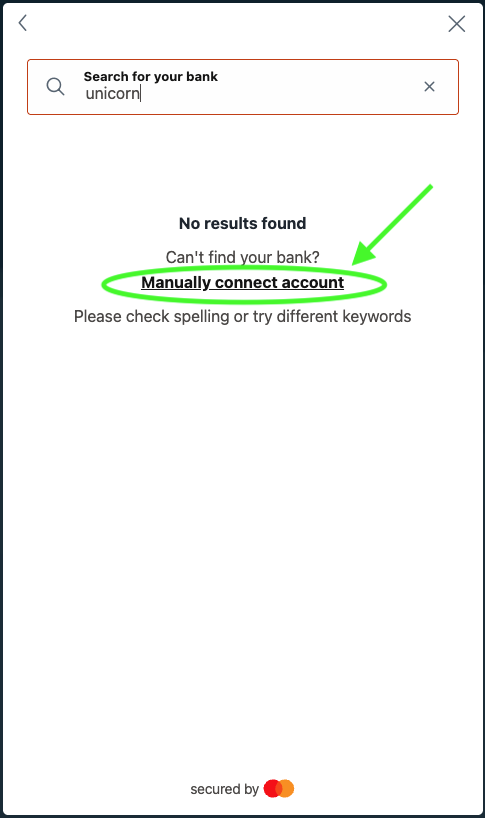
When going through Register Open Banking Customer user journey, in the Search for your bank field, either enter unicorn, Finbank Decertified, or Finbank offline and then click Manually connect account to simulate a scenario where the financial institution is not found, decertified, or has connection issues.
You can use the routing and account numbers from the table below for testing purposes to simulate the respective scenarios. When the Open Banking Registration endpoint updates to the microdepositCompleted event_type, you can generate a verification link using the Create Microdeposit Verification Link endpoint. To verify microdeposits during testing, always use the amounts $0.01 and $0.02. You have three attempts to enter the correct microdeposit amount. If you exceed three attempts, you’ll need to restart the scenario.
When verified, the response for the Open Banking Registration endpoint updates to the microdepositAccountVerified event_type. Take a record of the verified account Id from the webhook response. To get bank account details, call Get Customer Account Details API
NoteUse only test customers and the test account numbers during testing. If real account numbers are detected, an error code 42003 will be sent to the webhook listener.
| Routing Number | Account Number | Scenario |
|---|---|---|
| Any valid routing number, for example: 121000358, 267084131, 021101108, 322271724. |
| Used for user verification. The microdeposits must be manually verified. |
| Any valid routing number, for example: 121000358, 267084131, 021101108, 322271724. |
| Used for automatic verification. The microdepositStatus are automatically set to verified after an hour. |
| Any valid routing number, for example: 121000358, 267084131, 021101108, 322271724. |
| Used for reminders. A reminder webhook is sent to prompt the partner to seek verification of the microdeposits. |
| Any valid routing number, for example: 121000358, 267084131, 021101108, 322271724. |
| Used for expirations. The timeframe in which the microdeposits can be verified has expired. |
| Any valid routing number, for example: 121000358, 267084131, 021101108, 322271724. |
| Used for rejections. The microdeposits were rejected by the Financial Institution. |
More Information
- To view this endpoint in the API Explorer, see Create Microdeposit Verification Link.
- To view details on the fields included in this endpoint, see Create Microdeposit Verification Link - Field Descriptions.
Updated 4 months ago