
Fraud Login Event
NoteThis endpoint is only available to Fraud Transaction Monitoring customers. It is also not currently available in the Daily Fraud SFTP extracts. Event data and review outcome information is available using the API response to support data storage and audit purposes.
The Fraud Login Event endpoint enables you to send a notification to the Fraud Transaction Monitoring system whenever a cardholder logs in. This enables you to detect more fraud (especially the account takeover fraud type) and reduce false positive rates by introducing more granular rules. The parameters included in the API help define more fraud patterns. For example, if a device changes between logins and there is a payment sent shortly afterwards, then there could be a higher risk of a fraud transaction.
The Fraud Login Event Workflow
The following diagram displays the Fraud Login Event workflow:
- The customer logs in to the client’s Mobile or Web App.
- The client sends the Login event to Thredd using the Fraud Login API.
- Thredd passes on the Login event to the fraud system (such as Featurespace).
- The fraud system provides outputs from the fraud rules and records the Login event against the customer.
- Thredd passes on the outputs to the client.
- The customer makes a card transaction.
- The card transaction comes through Thredd and gets passed on to the fraud system.
- The fraud system approves or declines the transaction based on prior information about the Login event.
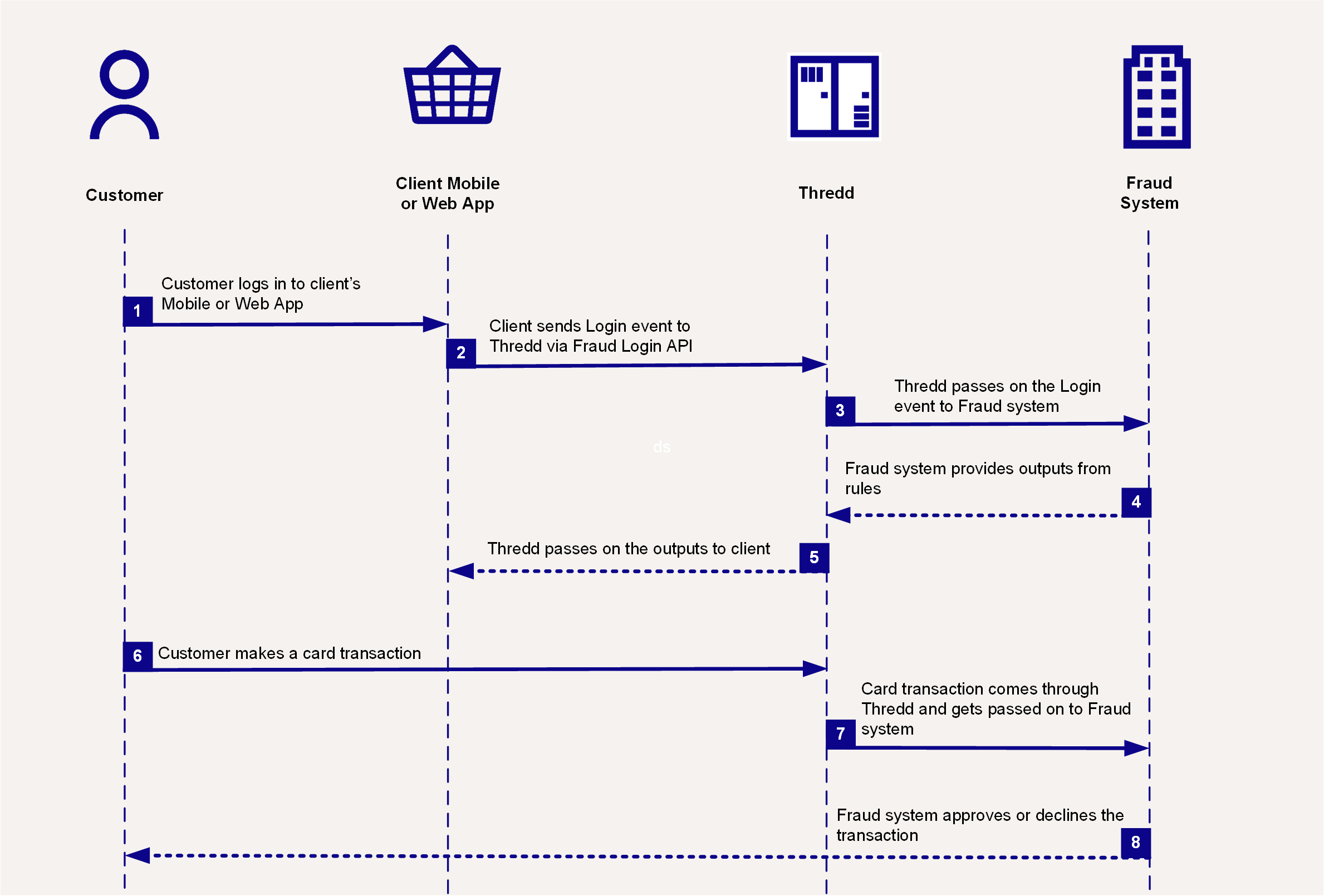
Fraud Login Event Process Diagram
NoteThis endpoint does not include a card's public token (cardId). Instead, a link should be made between the
customerIdfield tocustomerReference(for REST API customers), andCustAccount(for SOAP customers). This means that in order to link card transaction events in the Fraud Transaction Monitoring system, all cards created in Thredd must have a matching customer reference, which then gets passed on alongside card transaction data.
You can send a fraud login event notification by making a POST request to the Fraud Login Event endpoint. For example:
https://uat-api.thredd.com/risk/api/v1/fraud/loginThe POST body should include the details of the login, including information on the device and the type of verification. The below is an example of what the body can look like.
{
  "channel": "online",
  "customerEnrollmentDate": "2025-02-26T00:00:00Z",
  "customerFlag": [
    "VIP"
  ],
  "customerId": "CA13771612318",
  "customerType": "retail",
  "device": {
    "anonymizerInUseFlag": true,
    "areaCode": "020",
    "browserType": "Google Chrome",
    "browserVersion": "143.0.7499.147",
    "city": "London",
    "clientTimezone": "GMT+0",
    "continentCode": "EU",
    "cookieId": "9B1B9952EC2B47BD9CD67D117774EF23",
    "countryCode": "44",
    "countryName": "United Kingdom",
    "deviceIMEI": "WERWERWER",
    "deviceFingerprint": "1234",
    "deviceName": "PC",
    "flashPluginPresent": "yes",
    "httpHeader": "1223",
    "ipAddressV4": "192.168.10.10",
    "ipAddressV6": "2001:0db8:0000:0000:0000:ff00:0042:8329",
    "metroCode": "1B",
    "mimeTypesPresent": "yes",
    "mobileNumberDeviceLink": "07966123456193232",
    "networkCarrier": "EE",
    "oS": "iOS",
    "postalCode": "SW1A 1AA",
    "region": "E12000007",
    "sessionLatitude": 51.4500912,
    "timestamp": "2025-08-22T11:26:23.784",
    "sessionLongitude": -0.177627238449149
  },
  "deviceId": "FG9834YY82",
  "eventTime": "2025-12-10T15:41:26.575Z",
  "initiatingPartyType": "user",
  "programManagerCode": "123456789",
  "session": {
    "sessionId": "12324",
    "sessionStartTime": "2025-02-27T15:41:26.575Z"
  },
  "traceId": "b414f2ed-c1d4-4200-98b0-73396cd0f92e",
  "thirdPartyDetails": {
    "authenticationFailedReason": "user cancel"
  },
  "verificationResult": "SUCC",
  "verificationType": {
    "accountDigitalSignature": "FAIL",
    "avs": "NOVF",
    "biometry": "SUCC",
    "cryptogramVerification": "NOVF",
    "cardholderIdentificationData": "FAIL",
    "oneTimePassword": "SUCC",
    "other": "NOVF",
    "passiveAuthentication": "FAIL",
    "password": "NOVF",
    "tokenAuthentication": "FAIL"
  }
}
If successful, a 204 response is returned.
More Information
- To view this endpoint in the API Explorer, see Record Fraud Login Event.
- To view more details on the fields included in this endpoint, see Fraud Login Event - Field Descriptions.
Updated 3 months ago